Battery & Tech Basics
Why Is My Power Station Losing Charge in Storage?
Some loss is normal and some is the unit quietly eating itself. How to tell which you have, and the storage habit that prevents the expensive version.
We earn a commission on purchases made through links on this page, at no extra cost to you. How this works.
What's in this article
Normal, or a problem?
| Loss per month | Verdict |
|---|---|
| 1–3% | Normal. Nothing to do. |
| 3–5% | Normal for a unit with the radio on. |
| 5–10% | Something is awake. Check the list below. |
| Over 10% | Definitely a setting, not chemistry. |
| Reads 0% after a few weeks | Fault, or the AC output was left on. |
Measure it properly before deciding: note the percentage, leave it alone for four weeks without touching it, note it again. A reading taken a day apart tells you nothing, because the gauge itself is only approximate.
1. The inverter left switched on
The biggest single cause, and the one people never suspect.
Switching the AC output on tells the inverter to start producing mains voltage, and it keeps doing that whether anything is plugged in or not. An idling inverter can draw somewhere in the region of 5–20W. verify
That is not a trickle. A unit sitting there with its AC output on and nothing connected can flatten itself in a couple of weeks.
Fix it: switch the AC output off, not just the appliance. On most units that is a separate button from the main power button. Many units also have an auto-timeout setting that switches AC off after a period with no load — turn it on.
2. Bluetooth, Wi-Fi and the display
Everything that makes a modern power station convenient costs a little power all the time.
The wireless radio is the main one. A unit that stays visible in the app is a unit that is listening for the app, and listening costs current.
Fix it: if it is going into storage for a season, turn off Bluetooth and Wi-Fi in the settings. You lose remote monitoring of a unit you are not using anyway.
The display matters less but check it has a sleep timeout rather than staying lit.
3. Genuine self-discharge
What is left after you have switched everything off.
Lithium cells lose charge slowly on their own, and the rate rises sharply with temperature. This is chemistry rather than a setting, and there is no way to stop it — only to slow it.
Heat is the variable you control. A pack in a hot garage or an attic self-discharges faster and ages faster than the same pack indoors. verify That is the same reason the garage is the worst place to store emergency power, despite being where nearly everyone puts it.
Cold is different. Cold temporarily reduces how much you can draw, but it does not permanently drain the pack, and capacity comes back as it warms. Do not confuse a cold unit reading low with a unit that has lost charge.
4. The expensive failure
This is why the topic matters rather than being trivia.
Every pack has a voltage floor. Drop below it and the battery management system disconnects the cells to protect them. At that point the unit appears completely dead: no lights, no display, no response.
Most recover if you plug them into the wall and leave them for several hours — often with no sign of life for the first hour, because a deeply discharged pack is charged at a deliberate trickle. Some do not recover at all.
And it is frequently not a warranty claim. Manufacturers document a storage recharge interval precisely so they can point at it. "It sat in the garage for two years" is a conversation that rarely goes your way.
The habit that prevents all of it
Recharge every three to six months. Put it in your calendar.
That is the whole answer, it takes ten minutes, and it is the single most common way people lose a power station.
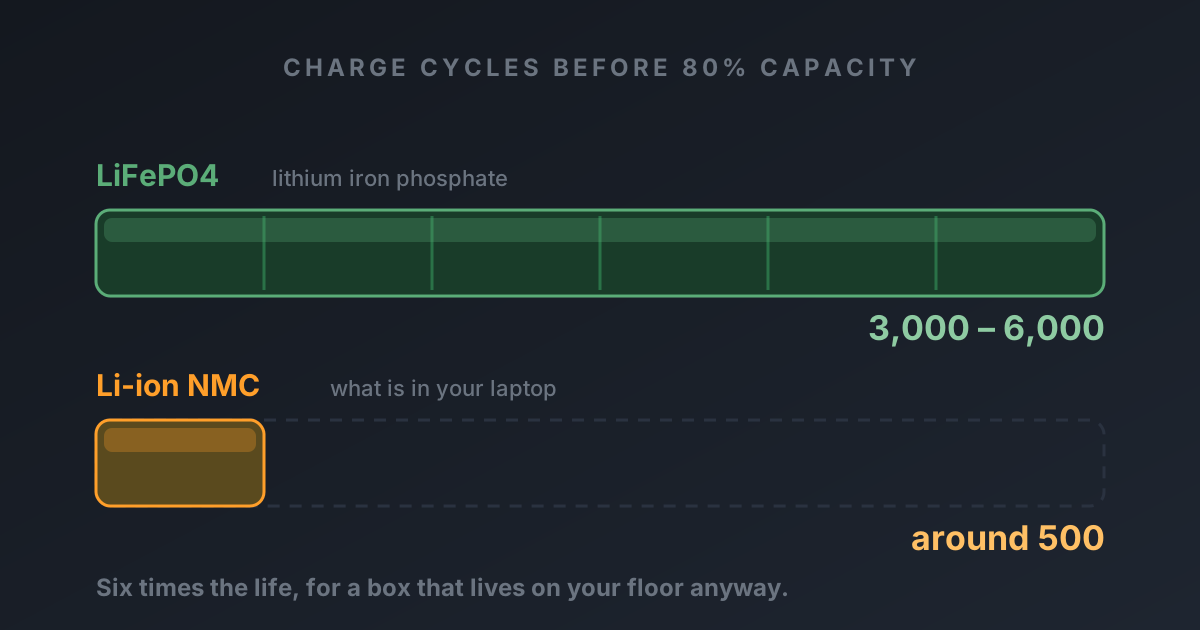
For a backup unit specifically, there is a better option: leave it plugged in permanently. With LiFePO4 that is exactly how it should live —
- the chemistry does not mind sitting at 100%
- it is genuinely full when the grid drops, rather than at whatever it drifted down to
- you get UPS behaviour, where it takes over instantly
- self-discharge stops being your problem entirely
Standby draw from the wall costs a few dollars a year. We did the arithmetic — it is not a number worth managing.
Older NMC chemistry is the exception: it degrades faster sitting at full charge, which is one more reason it is the wrong chemistry for backup.
Storing one properly for a season
For a unit going away — a camping unit over winter, say — rather than living plugged in:
- Charge to around 50%. Gentler on the cells than either extreme for long storage.
- Switch off AC, DC and USB outputs, then the unit itself.
- Turn off Bluetooth and Wi-Fi.
- Store indoors. Cool and dry beats convenient. Not the attic, not the garage, not a car.
- Set a calendar reminder for four months. Top back up to 50%.
That routine costs nothing and it is the difference between a unit that works in year eight and one that is a brick in year two.
When it really is a fault
Suspect the unit, not your habits, when:
- It loses more than 10% a month with everything confirmed off
- It goes from full to dead in under a month
- One charge holds fine but the next drains in days
- The case is warm while idle
A pack warm at rest with nothing running is drawing current somewhere it should not be. Stop using it and contact the manufacturer.
Swipe the table sideways to see every column.
| Price | |||||||
|---|---|---|---|---|---|---|---|
| AnkerAnker SOLIX C1000LiFePO4 · expandable | 1,056 Wh | 1,800W | 2,400W | 28.44 lb | 58 min | 5 yr | Check price for Anker SOLIX C1000 (opens in a new tab, affiliate link) |
| EcoFlowEcoFlow DELTA 2LiFePO4 · expandable | 1,024 Wh | 1,800W | 2,700W | 27 lb | 1h 20m | 5 yr | Check price for EcoFlow DELTA 2 (opens in a new tab, affiliate link) |
Specs come from data/products.json. Capacity is the figure on the box — real usable output is roughly 85% of it once you account for inverter losses.
The short version
A few percent a month is chemistry. More than that is a setting — nearly always an AC output left switched on, or the wireless radio.
If it is a backup unit, stop managing storage at all and leave it plugged in. If it genuinely has to be stored, charge it to half, switch everything off, keep it indoors, and set a reminder for four months' time.
The picks, in detail
Specs come from data/products.json, so they're the same everywhere on this site.
EcoFlow
EcoFlow DELTA 2
The one most people should buy. It refills fast enough that a short sunny break between storm bands actually matters.
- Capacity
- 1,024 Wh
- AC output
- 1,800W
- Weight
- 27 lb
What's good
- Wall recharge is genuinely quick — useful when power flickers back for an hour
- LiFePO4 cells, so it tolerates being left plugged in for years
- Six AC outlets means no daisy-chained power strips on the kitchen counter
- Add an extra battery later instead of buying a whole second unit
What's annoying
- The fan is audible in a quiet bedroom at night
- 1800W ceiling rules out most space heaters and hair dryers
- Expansion batteries cost nearly as much as the unit itself
Who this is wrong for
Anyone who needs to power a well pump, an electric water heater or a central AC. It will not start them, and it is not a whole-home unit.
Anker
Anker SOLIX C1000
The best-built 1kWh unit on the market, and the one that fits an RV bay without a shoehorn.
- Capacity
- 1,056 Wh
- AC output
- 1,800W
- Weight
- 28.44 lb
What's good
- The most compact 1kWh box here — it genuinely fits where others don't
- Anker's warranty service is the least painful in this category
- Full wall recharge in under an hour
- Quiet fan behaviour under moderate load
What's annoying
- Expansion battery caps you at about 2,112Wh and is expensive
- Fewer solar input options than EcoFlow
- Anker discounts less often, so you rarely catch a deep sale
Who this is wrong for
People who need to run more than 1800W. And it won't grow with you — expansion is limited.
Questions people actually ask
Why does my power station lose charge when it is not being used?
How much charge should a power station lose in storage?
How often should I recharge a stored power station?
Should I store a power station full or half charged?
Does cold weather make a power station lose charge?
Who wrote this
Dhruvil Domadiya
Founder and editor, GreenCommuteGuide
I started GreenCommuteGuide because backup power is sold with numbers that sound impressive and mean very little — watt-hours on the box, surge ratings that turn out to be a boost mode, charge times quoted to 80% and printed as though they were full. I set the rules this site runs on: every spec is checked against the manufacturer's own documentation, anything we have not verified is marked as unverified on the page rather than quietly published, prices are never shown because they go stale, and every review names at least one product not to buy and who it is wrong for. Where I have not tested something myself, the page says so.
- · Sets and enforces the editorial standards on this site — unverified claims are flagged on the page, and the build fails if they are not
- · Specs are taken from manufacturers' own published documentation, never from retailer listings, and the source and date are recorded for each product
- · No payment is accepted for a rating, a ranking, or a positive verdict
Read this next
- Battery & Tech BasicsWhy Won't My Power Station Turn On?Dead screen, no lights, nothing. Six causes in order of likelihood — and the deep-discharge one that looks exactly like a dead unit but usually is not.
- Battery & Tech BasicsHow Long Do Solar Generators Actually Last?The cells will outlive you. Something else will break first. Here is what actually fails, and the one habit that shortens a battery's life fastest.
- Battery & Tech BasicsLiFePO4 vs Lithium-Ion: Which Battery Lasts Longer?One chemistry lasts six times longer and does not catch fire. The other is lighter. Here is why almost every good power station now uses the first one.
- Battery & Tech BasicsHow to Store a Power Station Over Winter (Without Wrecking It)Store it at about half charge, indoors, and never charge it while it is below freezing. That last one destroys batteries permanently and almost nobody knows it.