Battery & Tech Basics
Why Is My Power Station Beeping?
A beep is a sentence. Count the beeps, check what changed, and you can name the cause in under a minute — including the two that mean stop using it now.
We earn a commission on purchases made through links on this page, at no extra cost to you. How this works.
What's in this article
Narrow it down by what changed
The beep itself tells you less than the moment it started.
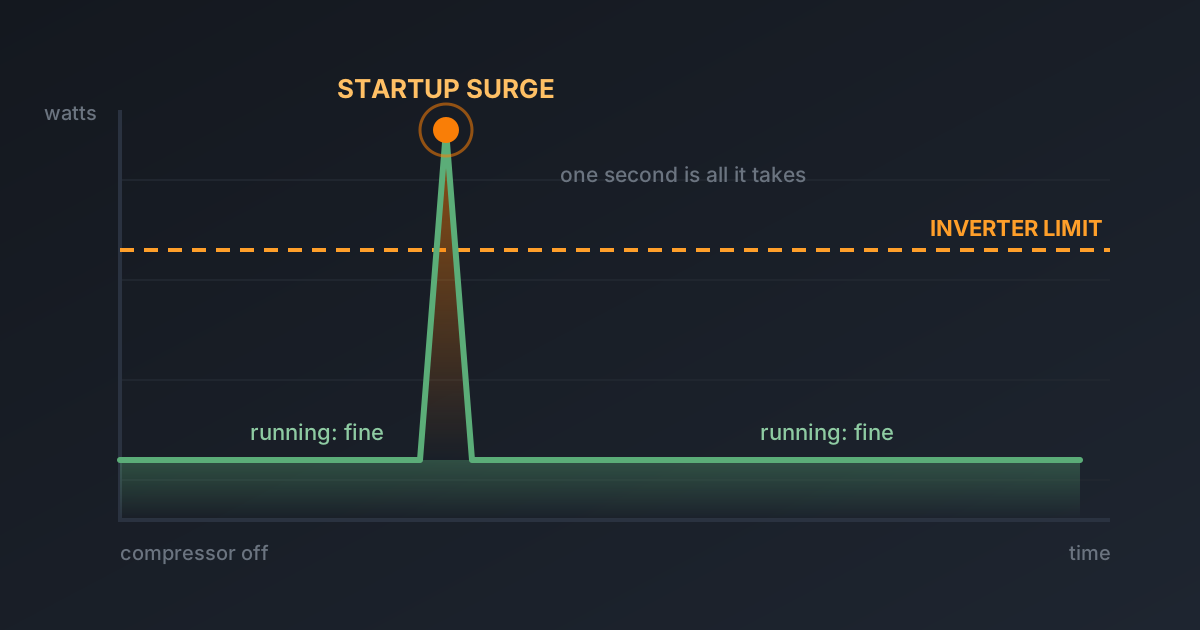
Started the instant you plugged something in → surge. The appliance spiked past the inverter's limit.
Started a few minutes into running several things → sustained overload. You are over the continuous rating, not the surge one.
Started while charging, nothing plugged into the outputs → temperature, almost always.
Started on its own, hours in, nothing changed → low battery, or heat building up.
Beeping with nothing connected and a full charge → this is the one that is actually a fault.
1. Overload — the big one
Two different limits produce nearly identical beeping.
Startup surge. A fridge compressor pulls around 150W running and spikes near 900W for under a second when it kicks on. verify A well pump is far worse. If that spike beats your surge rating, you get a beep and often a shutdown.
Continuous overload. Your unit does, say, 1,800W. A 1,500W heater plus a fridge plus a kettle puts you over it. This one builds — it runs for a while, then complains.
Fix it: unplug the biggest thing first, not the nearest thing. Add up the running watts of what is left and keep it comfortably under the rating.
If this keeps happening, the fix is surge headroom rather than capacity. We wrote out why in why your power station shuts off and in more detail in surge watts vs running watts.
2. Temperature
Lithium iron phosphate cells will not accept charge below freezing. Most units refuse rather than damage the pack, and many announce it with a beep and a snowflake icon.
Heat does the reverse — output throttles, the fan runs hard, and if it cannot shed heat fast enough you get a warning before a thermal cutoff.
Cold fix: bring it indoors, let it reach room temperature, then charge. Do not put it near a heater to speed this up.
Hot fix: clear space on all sides, out of direct sun, and reduce the load.
This one bites hardest in exactly the weather you bought it for — a garage in an ice storm is often below freezing.
3. Low battery
The friendliest beep on the list. Usually starts around 10 to 20 percent and gets more insistent as it empties.
Worth knowing: under a heavy load a unit can hit the low-voltage warning well above the percentage you would expect. The last fifth of a battery does less work than the first.
4. Fan and airflow
Some units beep when the fan is obstructed or has failed, because the next step is a thermal shutdown.
Look for: dust in the vents, something resting against the case, the unit inside a cabinet or a bag. Give it a few inches of clear air on every side.
5. A charger it does not recognise
Third-party or car chargers that do not match the expected voltage or current can trigger a warning tone. So can a solar array outside the accepted input range.
If the beeping started when you changed how you charge it, change it back and see. Our piece on solar charging failures covers the voltage window in detail.
6. The two that mean stop
Everything above is the unit protecting itself. These two are different.
Beeping with a hot or swollen case. Not warm — hot, or visibly bulging. Disconnect everything.
Beeping with an acrid, sharp or burning smell. Lithium cells that vent smell chemical and wrong, and there is no version of that which is fine.
In both cases: disconnect, move it outside away from anything that can burn, do not put it in a car, do not open it, and contact the manufacturer. A swollen pack is not a warranty argument to have in your living room.
Beep patterns are brand-specific
There is no industry standard here. Three short beeps means different things on an EcoFlow and a Bluetti, and manufacturers change the patterns between firmware versions.
What is consistent:
| Pattern | Usually means |
|---|---|
| Rapid, continuous | Overload — act now |
| Slow, spaced, repeating | Warning — low battery or temperature |
| Short burst, then silence | Acknowledgement, not a fault |
| Beep with the unit shutting down | Protection triggered |
verify — these are general patterns across the category, not any one manufacturer's documented codes. Your manual has the real table for your model, and it is the only source that is actually authoritative for it.
When the beeping is telling you that you bought wrong
Worth saying plainly, because a lot of repeat overload beeping is not a fault to fix.
If your unit beeps every time the fridge compressor cycles, it is not faulty and no setting will change it. It does not have the surge headroom for your fridge, and it never will. That is a sizing mistake, and the honest answer is that you need a different unit rather than a different setting.
Work out the number properly before buying the replacement, or you will do it twice.
Swipe the table sideways to see every column.
| Price | |||||||
|---|---|---|---|---|---|---|---|
| AnkerAnker SOLIX C1000LiFePO4 · expandable | 1,056 Wh | 1,800W | 2,400W | 28.44 lb | 58 min | 5 yr | Check price for Anker SOLIX C1000 (opens in a new tab, affiliate link) |
| EcoFlowEcoFlow DELTA 2LiFePO4 · expandable | 1,024 Wh | 1,800W | 2,700W | 27 lb | 1h 20m | 5 yr | Check price for EcoFlow DELTA 2 (opens in a new tab, affiliate link) |
Specs come from data/products.json. Capacity is the figure on the box — real usable output is roughly 85% of it once you account for inverter losses.
The short version
Beeping is information, not failure. Overload first, temperature second, low battery third, and those three cover nearly everything.
The exception is a beep alongside heat, swelling or a smell. That one is not a troubleshooting problem — put it outside and stop.
The picks, in detail
Specs come from data/products.json, so they're the same everywhere on this site.
EcoFlow
EcoFlow DELTA 2
The one most people should buy. It refills fast enough that a short sunny break between storm bands actually matters.
- Capacity
- 1,024 Wh
- AC output
- 1,800W
- Weight
- 27 lb
What's good
- Wall recharge is genuinely quick — useful when power flickers back for an hour
- LiFePO4 cells, so it tolerates being left plugged in for years
- Six AC outlets means no daisy-chained power strips on the kitchen counter
- Add an extra battery later instead of buying a whole second unit
What's annoying
- The fan is audible in a quiet bedroom at night
- 1800W ceiling rules out most space heaters and hair dryers
- Expansion batteries cost nearly as much as the unit itself
Who this is wrong for
Anyone who needs to power a well pump, an electric water heater or a central AC. It will not start them, and it is not a whole-home unit.
Anker
Anker SOLIX C1000
The best-built 1kWh unit on the market, and the one that fits an RV bay without a shoehorn.
- Capacity
- 1,056 Wh
- AC output
- 1,800W
- Weight
- 28.44 lb
What's good
- The most compact 1kWh box here — it genuinely fits where others don't
- Anker's warranty service is the least painful in this category
- Full wall recharge in under an hour
- Quiet fan behaviour under moderate load
What's annoying
- Expansion battery caps you at about 2,112Wh and is expensive
- Fewer solar input options than EcoFlow
- Anker discounts less often, so you rarely catch a deep sale
Who this is wrong for
People who need to run more than 1800W. And it won't grow with you — expansion is limited.
Questions people actually ask
What does it mean when a power station beeps continuously?
Is a beeping power station dangerous?
Why does my power station beep when I plug something in?
Why does my power station beep while charging?
How do I turn off the beeping on my power station?
Who wrote this
Dhruvil Domadiya
Founder and editor, GreenCommuteGuide
I started GreenCommuteGuide because backup power is sold with numbers that sound impressive and mean very little — watt-hours on the box, surge ratings that turn out to be a boost mode, charge times quoted to 80% and printed as though they were full. I set the rules this site runs on: every spec is checked against the manufacturer's own documentation, anything we have not verified is marked as unverified on the page rather than quietly published, prices are never shown because they go stale, and every review names at least one product not to buy and who it is wrong for. Where I have not tested something myself, the page says so.
- · Sets and enforces the editorial standards on this site — unverified claims are flagged on the page, and the build fails if they are not
- · Specs are taken from manufacturers' own published documentation, never from retailer listings, and the source and date are recorded for each product
- · No payment is accepted for a rating, a ranking, or a positive verdict
Read this next
- Battery & Tech BasicsWhy Did My Power Station Shut Off By Itself?Nine times out of ten it is the startup surge, not the battery. Here is how to tell which of the five causes you have, in about a minute.
- Battery & Tech BasicsPower Station Says Overload — What Now?Get it running again in two minutes, then find out whether it was a one-off or the unit telling you it is too small for the job. The two need different answers.
- Battery & Tech BasicsIs It Safe to Use a Power Station Indoors?Yes, and that is the entire reason they beat gas generators. Here are the four real risks, and the one that actually kills people.
- Home Outage & BackupBest Solar Generators for Power Outages in 2026Which battery actually gets your family through the night, which one is a waste of money, and how to tell the difference before you spend.